
Semiconductor & Automation Technology (SAT) Certification
The Semiconductor and Automation Technology (SAT) Certification equips students with a comprehensive skill set essential for success in the semiconductor industry. Students engage in hands-on learning that covers the assembly and integration of semiconductor machinery, robot programming, cleanroom operations, and simulated wafer fabrication processes. By mastering these skills, students gain the practical experience needed to confidently navigate the complexities of semiconductor fabrication.

What are the benefits of getting certified?
Industry-Recognized Expertise: Gain a certification that validates your knowledge and skills in semiconductor fabrication, making you a sought-after candidate in a competitive job market.
Hands-On Experience: Acquire practical, hands-on experience in critical areas such as semiconductor machinery assembly, cleanroom operations, and robot programming, ensuring you’re job-ready from day one.
Career Advancement: Enhance your employability and open up opportunities for advanced roles such as Semiconductor Technician or Wafer Fabrication Technician.
Proficiency in Industry 4.0 Technologies: Develop a deep understanding of Industry 4.0 technologies, positioning yourself at the forefront of the evolving semiconductor and automation industries.
Comprehensive Skill Set: Build a versatile skill set that bridges the gap between theoretical knowledge and practical application, enabling you to tackle complex challenges in the semiconductor industry with confidence.

- Silicon Process: silicon and wafer fabrication.
- Clean Room Practice: safe cleanroom practices and policies.
- Spin, Coat, Bake (Photo 1): photolithography and the materials used in the coating process.
- Expose, Develop, Pattern Generation: pattern generation in wafer manufacturing.
- Etch: plasma etching in wafer manufacturing.
- Photoresist Strip: removing photoresist layers and assessing wafer patterning.
- Deposition: plasma deposition in wafer fabrication.
- Metrology: metrology testing and applications.
- Polishing & Surface Clean: polishing and cleaning in the wafer manufacturing flow.
- Bonding and Debonding: bonding wafers for specific manufacturing processes, and removing sensitive wafers from carriers.
- Probing: electrical wafer probing.
Before test day, the proctor:
-
Is an authorized school or testing-center staff member who is not the students’ course teacher
-
Receives a ROOTS LMS account and is enrolled with teacher-level access in the exam’s associated testing course
-
Confirms all testing devices meet technical and browser readiness requirements at least 72 hours before the exam.
-
Receives the exam Access Code by email from ROOTS, if the exam uses one, and keeps it private.
-
Logs into the ROOTS LMS, opens the certification exam in its associated course, selects Build, and opens the Moderate tab to identify all candidates with approved accommodations (Extended Time 1.5x, Extended Time 2.0x, or Reduced Answer Choices)
On test day, the proctor:
-
Checks students in and verifies candidate identity.
-
Has students log into the ROOTS LMS, open the exam during the authorized testing window, and enter the Access Code if the exam uses one.
-
Actively supervises the exam at all times to maintain testing security and closed-book conditions
-
Ensures candidates with approved accommodations receive their authorized adjusted time limits and exam configurations
-
Confirms every student has properly submitted the exam before leaving the testing area.
-
Reports any testing irregularities, technical interruptions, or security violations to ROOTS Education Co. on the same day.
1. Scheduling & Accommodation Requests
-
Accommodation Submissions: All testing accommodation requests and required verification documentation must be submitted through the authenticated ROOTS Canvas LMS portal at least ten (10) business days prior to test day (see the Accommodations tab for full instructions)
-
Testing Windows: Examinations must be scheduled and administered within authorized testing windows. Where a school district or college is approved to manage testing windows, the scheduled block must accommodate the full adjusted time limit for any candidate with approved Extended Time (1.5x or 2.0x)
2. Exam Administration & Testing Environment
-
Closed-Book Conditions: All certification exams are closed-book and closed-note unless explicitly stated in the exam instructions. Unauthorized reference materials, study guides, and external websites are prohibited.
-
Personal Devices: Cell phones, smartwatches, earbuds, cameras, and other personal electronic devices must be powered off and stored away from the testing workstation for the duration of the exam.
-
Proctored Supervision: Exams must be administered in a quiet, supervised testing environment with an authorized proctor present throughout the session
-
Administering Accommodations: On test day, the proctor ensures candidates with approved accommodations receive their configured Extended Time (1.5x or 2.0x) or Reduced Answer Choices as verified in the exam’s Moderate tab
3. Incident Reporting, Retakes, & Academic Integrity
-
Same-Day Incident Reporting: Any technical failure, network outage, or testing irregularity must be documented and reported to ROOTS Education Co. on the same day the incident occurs.
-
Score Reporting Parity: Candidate test scores are reported identically to standard administrations with zero accommodation flags, asterisks, or notations
-
Retakes & Violations: Candidates who do not pass an initial attempt must follow ROOTS retake waiting-period policies before retesting. Any confirmed cheating, unauthorized device use, or exam content sharing will result in immediate score invalidation and a 6-month testing ban.
Every ROOTS Engineering Services certification exam requires Respondus LockDown Browser. Testing devices must be school or testing-center devices; student-owned devices are not allowed.
- Devices: Windows 10 or 11; macOS 12 or later; iPadOS 15 or later; or a Chromebook on current ChromeOS.
- Storage: 75 MB free on Windows, 120 MB on Mac.
- Installation: install LockDown Browser from the ROOTS download link only: download.respondus.com/lockdown/canvas.php?ID=577177172. Installing on Windows and Mac needs administrator rights. Chromebooks use the LockDown Browser extension, and iPads use the LockDown Browser app.
- Network: a stable internet connection, with respondus.com and respondus2.com allowed through firewalls and content filters.
- Device check: before test day, the proctor runs the LockDown Browser Test Quiz on every device.
- Browser: a current version of Chrome, Edge, Firefox or Safari to log into the ROOTS LMS. LockDown Browser opens from the exam page.
A webcam and microphone are not needed: ROOTS exams are supervised in person by the proctor.
Testing Accommodations
Supported Accommodations
ROOTS Education Co. supports three standardized accommodations for certification exams delivered through the ROOTS Canvas LMS
-
Extended Time (1.5x standard time)
-
Extended Time (2.0x standard time)
-
Reduced Answer Choices
Approved accommodations apply to the specific certification exam and the current school year’s attempts only
Required Verification Form & FERPA Authorization
Candidates must submit a completed ROOTS Test Accommodation Verification (REV2) form
-
Candidates under 18 years of age: Require a Parent or Legal Guardian signature
-
Candidates 18 years of age or older: Must sign on their own behalf
Verification Pathways
In addition to the signed Verification Approval form, select one of three verification pathways
-
Option 1 — Standard School Verification Letter: Attach a one-page letter on official school letterhead signed by a school counselor, case manager, or administrator confirming that the requested accommodations are active under a current IEP, Section 504 Plan, or formal school-based support plan
-
Option 2 — Alternate Documentation: Available if an active IEP/504 is unavailable, expired within the last 12 months, or the student is enrolled in non-traditional schooling (e.g., home school, independent study)
-
Option 3 — Live Institutional Video Review: The school testing coordinator or teacher schedules a brief, secure live video conference with a ROOTS Curriculum Specialist to visually share and confirm the active testing accommodations page of the candidate’s current IEP or 504 Plan
Encrypted Submission Instructions (Canvas LMS Portal)
To ensure end-to-end encryption of student records pursuant to Florida Statutes § 1002.22 and § 501.171, do NOT send forms or verification letters via unencrypted email
1. Log into your ROOTS Canvas account.
2. Navigate to the Testing Accommodations Verification course
3. Open the Accommodation Documentation Upload assignment and submit the required files
-
-
Option 1 or Option 2: Upload (1) the completed, signed Verification Approval form, and (2) the one-page signed verification/history letter
-
Option 3: Upload the completed, signed Verification Approval form only
-
Processing Timelines, Privacy, & Score Parity
-
Standard Review Period: Completed submissions are reviewed, and written determinations are posted directly within Canvas assignment feedback and emailed within ten (10) business days of receipt
-
Incomplete Submissions / Cure Period: If additional details or clarifications are required, the submitter is notified via Canvas assignment comments and granted a fourteen (14) business day cure window to upload supplemental documentation without canceling scheduled exams
-
Privacy & Data Purge Schedule: Medical evaluations, psychological reports, clinical histories, and diagnostic codes are strictly prohibited and immediately purged if submitted
-
Score Reporting Parity: Candidate test scores are reported identically to standard administrations with zero accommodation flags, asterisks, or notations
-
Questions: Send general questions about accommodations (without attaching student records) to
cert.registration@rootsengineering.com
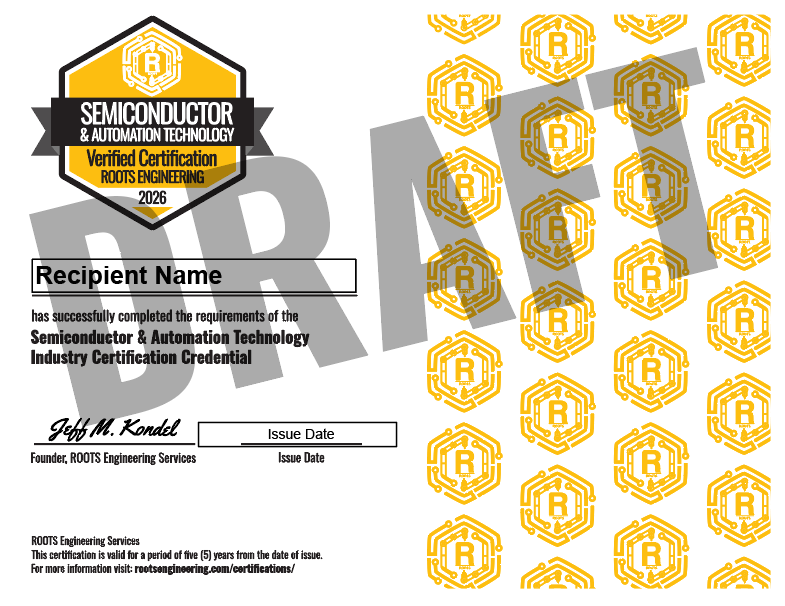
SAT cert Sample
READY TO take one of our industry certifications?